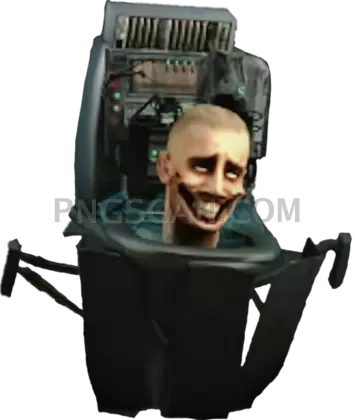
Skibidi Toilet Cutout That Hits Different in Every Edit
About Skibidi Toilet
This crisp skibidi toilet png captures the iconic meme character in full detail — head popping out of the toilet, weird grin and all — isolated on a transparent background so you can slap it into literally any project. The cutout is clean around every edge, which means no janky white borders ruining your compositions.
Meme lords, thumbnail makers, and anyone who edits videos for fun will get a ton of mileage out of this asset. Think reaction images for Discord, custom stickers for your friend group, or that perfectly cursed YouTube thumbnail that actually gets clicks. It's the kind of image that does the heavy lifting in Skibidi Toilet meme edits without you needing to mask anything yourself.
Quick tip: since the background is already transparent, you can layer this directly over gameplay screenshots, gradient backgrounds, or even photos of your teacher's whiteboard (we won't judge). Open it in Canva, Photoshop, or even Google Slides — the PNG format plays nice with basically everything. Resize carefully from the original dimensions to keep that sharpness intact.
The image comes in at 1080×1275 pixels with natural color rendering, so it holds up well on both mobile screens and desktop monitors. As with all meme-origin content, use this for personal and fan projects — not for commercial merchandise or anything that could step on the original creator's rights. Explore more Skibidi Toilet PNG images in our gallery.
Frequently Asked Questions
Answers about this Skibidi Toilet PNG — transparent background, size, download, and permitted use.
It's 1080×1275 pixels, which gives you a tall portrait-style cutout that works great for phone wallpapers, vertical video thumbnails, and social media stories.
Yes, the background is fully transparent. The Skibidi Toilet character is cleanly cut out so you can place it over any background without extra editing.
Absolutely. The 1080-pixel width and clean edges make it ideal for thumbnails. Just drop it into your editor, scale it to fit, and pair it with bold text for maximum click appeal.
Pretty much any image editor handles it — Photoshop, GIMP, Canva, Figma, Google Slides, and even basic phone photo editors all support PNG files with transparency.
More from the Skibidi Toilet Collection


Related Transparent PNG Images

Steal a Brainrot 566x459

Steal a Brainrot – Square Cutout Edition

Steal a Brainrot 1024x1024

Steal a Brainrot – Compact Meme

Steal a Brainrot – Mini Sticker Format


