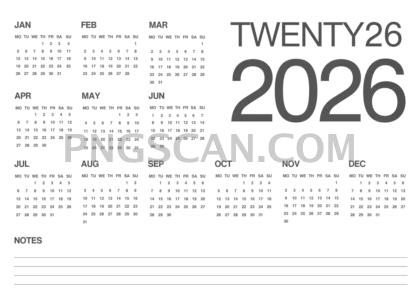
2026 Calendar Landscape Cutout — Wide Format
About Calendar 2026
Most calendar PNGs out there are portrait-oriented, which is great until you need one for a website banner, a slide deck, or a widescreen wallpaper. This 2026 calendar 2500x1768 free cutout png solves that problem instantly — it's a clean landscape layout with natural colors sitting on a fully transparent background, so it blends right into whatever you're building.
If you put together yearly planners, social media headers, or presentation slides, this is the kind of asset that saves you thirty minutes of fiddling in Photoshop. Teachers use wide calendars like this for classroom dashboards. Small business owners drop them into internal newsletters. Even personal planner nerds love having a full-year view they can paste into their digital journals. You might also like Calendar 2026.
Quick practical tip: because the transparent background is already baked in, you can place this directly over any colored or textured surface and it just works. Try layering it on a muted gradient for a polished look, or slap it onto a photo background for something more creative. The natural color palette keeps it versatile — it won't clash with most design schemes. You might also like Calendar 2026 2640x1485.
The file measures 2500×1768 pixels, giving you plenty of resolution for both screen and mid-size print use. It's a PNG cutout, so edges stay crisp at full size with no white box artifacts. This download is free for personal and non-commercial fan projects — just double-check usage rights if you're planning anything commercial. Explore more Calendar 2026 PNG images in our gallery.
Frequently Asked Questions
Answers about this Calendar 2026 PNG — transparent background, size, download, and permitted use.
Yes, at 2500×1768 pixels you can print it clearly up to roughly 8×6 inches at 300 DPI. For larger prints you may notice some softness, but for desk-size planners or notebook inserts it works perfectly.
It means there's no white rectangle behind the calendar. You can drop it onto any background color, texture, or photo and it blends naturally — no extra editing needed to remove a solid backdrop.
The PNG itself has fixed natural colors, but since the background is transparent, you can easily adjust hue and saturation in any image editor. The muted, natural tones are chosen to look good on most backgrounds without modification.
More from the Calendar 2026 Collection
Related Transparent PNG Images

Steal a Brainrot 566x459

Steal a Brainrot – Square Cutout Edition

Steal a Brainrot 1024x1024

Steal a Brainrot – Compact Meme

Steal a Brainrot – Mini Sticker Format


