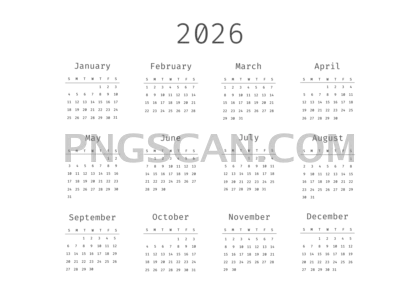
2026 Calendar Cutout in Landscape
About Calendar 2026
This calendar 2026 2500x1768 png gives you every month of 2026 on a single landscape image with the background already removed. No eraser tool, no fiddling with layers — it lands clean on whatever surface you put it on, whether that's a desktop wallpaper mockup, a planner cover, or a slide deck.
Teachers paste it into classroom handouts. Small business owners toss it onto branded flyers. Couples building wedding timelines stick it right into their Canva boards. Basically, anyone who needs a quick visual of the full year without wrestling with design software will get mileage out of this one. You might also like Calendar 2026.
Because the resolution sits at 2500×1768 pixels, you can scale it down for screens or print it at roughly 8×6 inches at 300 DPI without things getting fuzzy. The natural color palette keeps it neutral enough to blend with most designs — no neon surprises. Pro tip: drop it onto a textured paper background for an instant vintage-planner look.
The cutout comes as a PNG file with a transparent background at 2500×1768. It's offered for personal and non-commercial creative projects — double-check the license on the download page if you plan to use it in anything you're selling. Explore more Calendar 2026 PNG images in our gallery.
Frequently Asked Questions
Answers about this Calendar 2026 PNG — transparent background, size, download, and permitted use.
This version is landscape-oriented, so it's wider than it is tall. That makes it a better fit for widescreen presentations, desktop wallpapers, and horizontal print layouts where a portrait calendar would leave awkward empty space on the sides.
Yes. At 2500×1768 pixels you can print it at about 8.3×5.9 inches at 300 DPI, which is sharp enough for a planner insert or a pinboard printout. For poster-sized prints you'd want something larger, but for standard paper sizes it holds up well.
It uses earthy, muted tones rather than bright or saturated colors. Think soft greens, warm browns, and neutral grays — the kind of palette that won't clash when you layer it over photos, textured backgrounds, or branded materials.
Open the PNG in any image editor or design app — Photoshop, GIMP, Canva, Google Slides — and place it on your canvas. The transparent areas will show whatever is behind it, so the calendar floats naturally on your chosen background without a white box around it.
More from the Calendar 2026 Collection
Related Transparent PNG Images

Steal a Brainrot 566x459

Steal a Brainrot – Square Cutout Edition

Steal a Brainrot 1024x1024

Steal a Brainrot – Compact Meme

Steal a Brainrot – Mini Sticker Format


