Welsh Corgi
About Welsh Corgi #400
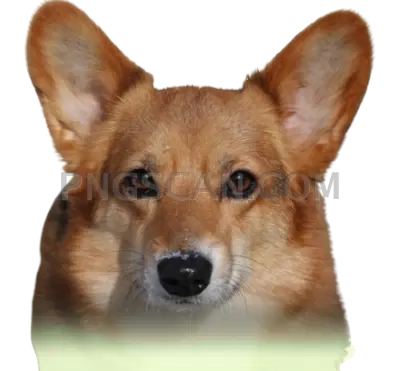
This welsh corgi png isolated image 401x371 shows the breed the way most people picture it: low-slung body, upright ears, and a coat kept in natural browns and whites rather than a stylised palette. The cutout was trimmed close to the fur line, so the silhouette reads as a corgi even at small sizes, and nothing behind the dog carries over into your layout.
Pet groomers and small breed-focused shops reach for a file like this when a flyer needs a friendly face without a photo shoot. Teachers drop it into worksheets and reading cards, hobby crafters cut it for scrapbook pages and planner stickers, and web builders use it as a thumbnail or a spot illustration on an adoption or blog page. You might also like Welsh Corgi.
Because the source is under 400 pixels wide, treat it as a small-to-medium element rather than a hero graphic. It holds up in a sticker sheet, a sidebar, a slide corner, or a card, but stretching it across a full banner will soften the fur edges. Place it on a light or mid-tone background so the white chest and paws stay visible. You might also like Welsh Corgi natural.
The file is a PNG with a true alpha channel, so the empty area stays empty in Canva, Figma, Photoshop, GIMP, PowerPoint, Google Slides, and Cricut Design Space with no extra masking. It is offered under a free license for personal and commercial projects; check the license note on the download page before redistributing the file itself.
faq_placeholder_removed Explore more Welsh Corgi PNG images in our gallery.
Frequently Asked Questions
Answers about this Welsh Corgi #400 PNG — transparent background, size, download, and permitted use.
The image is 401x371 pixels, a compact size suited to stickers, thumbnails, worksheet art and slide accents rather than large-format printing.
Yes. It is saved as a PNG with an alpha channel, so the area around the corgi stays fully transparent when you place it over any colour, photo or pattern.
It is offered under a free license that covers personal and commercial use, such as shop flyers, presentations and client mockups. Review the license details on the download page before you redistribute the raw file.
Any modern editor handles it, including Canva, Figma, Photoshop, GIMP, Illustrator, PowerPoint, Google Slides, Word and Cricut Design Space. No conversion or background removal is needed.
More from the Welsh Corgi Collection


Related Transparent PNG Images
SUP Board
SUP Board 1500x1500

SUP Board natural

SUP Board 600x600

SUP Board 1000x1000