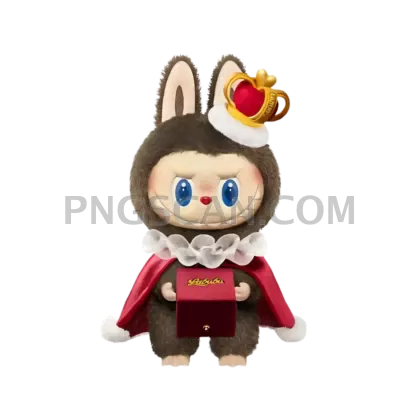
Labubu Cutout — Clean Square
About Labubu
This labubu cutout 1000x1000 png 1000x1000 gives you a sharp, isolated Labubu figure rendered in its original natural colors with absolutely nothing behind it. No white edges, no leftover pixels — just the character sitting on a transparent background, waiting for you to put it somewhere fun.
Sticker makers love a square cutout like this because it fits templates without awkward cropping. Fans building phone wallpapers, custom greeting cards, or social media edits will find the 1000×1000 size hits a sweet spot — big enough to look crisp on screen, small enough to keep file sizes manageable. It's also a solid pick if you're assembling a Labubu mood board or fan collage and want every piece to blend seamlessly. You might also like Labubu.
Quick tip: since the background is already gone, you can layer this cutout directly over textured backgrounds in Canva, Photoshop, or even Google Slides. Try placing it on a pastel gradient for a cute poster effect, or duplicate it in a pattern for wrapping paper or notebook cover designs. The natural color palette means it pairs well with earthy tones without clashing. You might also like Labubu 1000x1000.
The image measures exactly 1000×1000 pixels and downloads as a PNG file with full transparency. Use it freely for personal projects, fan art, and non-commercial creative work — just keep it out of anything you plan to sell or officially brand, since Labubu's character design belongs to Pop Mart. Explore more Labubu PNG images in our gallery.
Frequently Asked Questions
Answers about this Labubu PNG — transparent background, size, download, and permitted use.
You can scale it down without any issues. Scaling up past 1000 pixels will start to soften the details, so if you need a larger version, check if a 1600×1600 or 2000×2000 Labubu PNG is available on the site instead.
Yes — this is a proper cutout, not a quick background removal with fuzzy halos. The edges are crisp, so when you place it on a dark or colored background you won't see white fringing around the figure.
Any app that supports PNG transparency will work — Photoshop, GIMP, Canva, Figma, Google Slides, Procreate, and even basic photo editors on your phone. The file behaves like any standard transparent PNG.
More from the Labubu Collection
Related Transparent PNG Images

Steal a Brainrot 566x459

Steal a Brainrot – Square Cutout Edition

Steal a Brainrot 1024x1024

Steal a Brainrot – Compact Meme

Steal a Brainrot – Mini Sticker Format


