Labubu
About Labubu
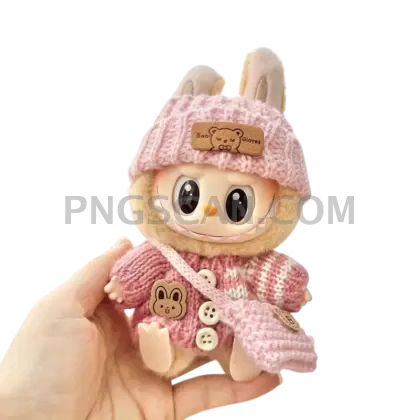
Here's the thing about a solid labubu png 800x800 — it hits that sweet spot where the image is sharp enough for close-up detail but light enough to not slow down your workflow. This particular cutout captures the Labubu figure in its natural colors against a fully transparent background, so every quirky tooth and texture comes through exactly as it should.
Fan artists building Labubu shrine posts, people making custom phone wallpapers, or anyone putting together a birthday card for that one friend who's obsessed with blind box toys — this is the file you actually want sitting in your downloads folder. It works just as well dropped into Canva as it does layered into Photoshop or Procreate. You might also like Labubu.
Quick tip: since this is an 800×800 square cutout, it fits perfectly into Instagram grid posts and profile-picture templates without any awkward cropping. Toss a colored circle behind it, add some text, and you've got a clean social post in under two minutes. You might also like Labubu 1000x1000.
The file is a transparent background PNG at 800×800 pixels in HD quality with natural coloring — no filters, no weird color shifts. As with any character image, Labubu is a Pop Mart / Kasing Lung creation, so keep your use personal and non-commercial to stay on the right side of things. Explore more Labubu PNG images in our gallery.
Frequently Asked Questions
Answers about this Labubu PNG — transparent background, size, download, and permitted use.
At 800×800 pixels you can comfortably print stickers and small cards up to about 2.5–3 inches at 300 DPI. For anything poster-sized you'd want a larger resolution, but for stickers, journal decorations, and digital use it's more than enough.
This cutout uses the figure's natural, unfiltered colors — the original tones you'd see on the actual toy. There are no pink tints, no stylized filters, just the standard Labubu palette on a transparent background.
Absolutely. Import the PNG into any video editor that supports transparency (Premiere Pro, DaVinci Resolve, CapCut) and it'll layer over your footage cleanly. The 800×800 size works well as an overlay element or reaction graphic without dominating the frame.
This version is specifically 800×800 in HD with natural coloring. Other variants on the site come in different dimensions like 450×450 or 1000×1000, or feature alternate color styles like the pink edition. This one is the middle-ground option — detailed enough for quality work, compact enough for fast loading.
More from the Labubu Collection
Related Transparent PNG Images

Steal a Brainrot 566x459

Steal a Brainrot – Square Cutout Edition

Steal a Brainrot 1024x1024

Steal a Brainrot – Compact Meme

Steal a Brainrot – Mini Sticker Format


