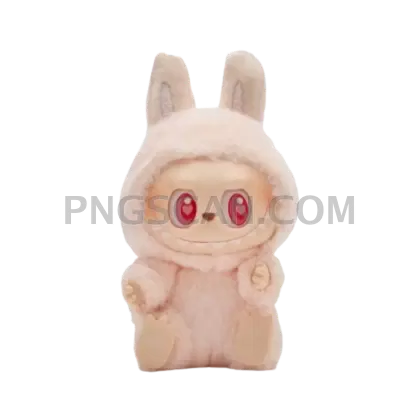
Labubu Natural Cutout in Full
About Labubu natural
This labubu natural png gives you the earthy, muted version of everyone's favorite little creature — isolated on a clean transparent background and sharp enough to zoom in without losing detail. No weird white boxes, no leftover edges, just the figure sitting pretty at 1000×1000 pixels.
Fan artists building Labubu shrine pages, people making custom phone wallpapers, or anyone putting together a birthday card for that one friend who collects these — this is the cutout you actually want. The natural color tone hits different from the loud pink variants and works way better when you're blending it into moodboards or neutral-themed layouts. You might also like Labubu.
Quick tip: drop this PNG into Canva or Photoshop and layer it over a kraft paper texture or a warm gradient. The natural palette practically melts into those backgrounds, so you get that cozy handmade look without fighting color clashes. Works great for sticker mockups too since the earthy tones print clean. You might also like Labubu 1000x1000.
The file is 1000×1000 pixels with a fully transparent background — solid for screen use, social posts, and mid-size print projects. As always, this cutout is meant for personal and fan use only, not commercial resale or . Explore more Labubu PNG images in our gallery.
Frequently Asked Questions
Answers about this Labubu natural PNG — transparent background, size, download, and permitted use.
This cutout features Labubu in its natural, earthy color palette instead of the signature pink. The muted tones make it easier to blend into neutral or vintage-style designs without clashing with your background.
At 1000×1000 pixels you can comfortably print up to about 3.3 inches at 300 DPI, which is perfect for stickers, journal inserts, and small card designs. For poster-size prints you would want a larger resolution.
Yes — the transparent background means you can import it directly into video editors like CapCut, Premiere, or DaVinci Resolve as an overlay. It works well for intros, reaction clips, or decorative elements in fan content.
Always export your finished design as a PNG file, not a JPG. JPG format flattens transparency and adds a white background. Most editors like Canva and Photoshop have a PNG export option that preserves the cutout.
More from the Labubu Collection
Related Transparent PNG Images

Steal a Brainrot 566x459

Steal a Brainrot – Square Cutout Edition

Steal a Brainrot 1024x1024

Steal a Brainrot – Compact Meme

Steal a Brainrot – Mini Sticker Format


