Vizsla Dog — Transparent Cutout Ready to Drop In
About Vizsla Dog #309
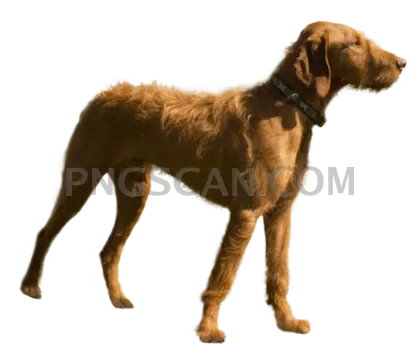
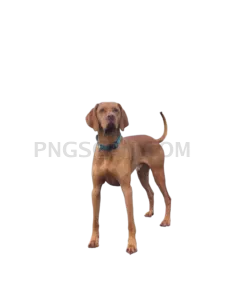
This vizsla dog png 567x489 is exactly what it sounds like: a rust-colored Hungarian pointer, clipped out of its background, sitting on a transparent alpha channel and waiting for you to place it wherever you want. No white box. No gray checkerboard baked into the pixels. Just the dog.
The 567x489 dimensions are the quiet hero here. It's big enough to look sharp in a sidebar, a card, a hero band, or a slide, but small enough that it won't turn your page into a loading screen. If you've ever dropped a 4000px stock photo into a blog post and watched your Lighthouse score fall off a cliff, you already understand the appeal. You might also like Vizsla Dog.
Vizslas photograph beautifully, which is half the reason designers keep reaching for them. That golden-rust coat plays nicely against dark navy, cream, sage, and just about any brand palette you throw at it. The cutout edges follow the ear tips and the fine hairs along the muzzle, so you're not stuck with a halo of leftover background pixels every time you place it on a colored panel. You might also like Vizsla Dog #279.
Use it for a pet care landing page, a breed guide, a vet clinic site, a training app onboarding screen, a shelter donation banner, or a slide that just needed a good dog in the corner. It layers over gradients, photos, and flat color equally well, and because the transparency is real, you can scale it down or drop a soft shadow behind it without any awkward rectangles giving the game away. Explore more Vizsla Dog PNG images in our gallery.
Frequently Asked Questions
Answers about this Vizsla Dog #309 PNG — transparent background, size, download, and permitted use.
Actually transparent. The file carries a real alpha channel, so the area around the dog is empty rather than filled with white pixels. Place it over any color, gradient, or photo and only the Vizsla shows up.
You can push it a little, but 567x489 is built for screens. Enlarging much past its native size will soften the edges. For a poster or anything going to a print shop, start from a higher-resolution source instead.
Anything that handles PNG, which is basically everything: Photoshop, Figma, Canva, GIMP, Affinity, PowerPoint, Google Slides, and every modern browser. Transparency is preserved in all of them, so you can layer it immediately without extra prep.
More from the Vizsla Dog Collection
Related Transparent PNG Images

Capybara

Capybara 512x512

Capybara 651x326

Capybara 960x600
Capybara 2500x2500