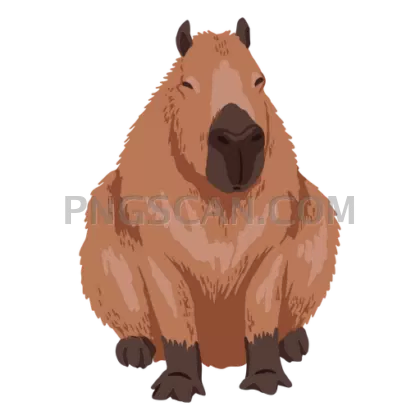
Sitting Capybara in Natural Brown Tones
About Capybara natural natural
This capybara png natural tones file shows the animal in its most characteristic pose: settled low, unhurried, looking mildly unimpressed by everything. The cutout keeps the coarse coat texture intact along the back and flanks, so it still reads as a real animal rather than a flat shape once you scale it down. Edges around the paws and ears were trimmed close, which matters when you place it over a colored panel.
Teachers building South American ecosystem units use this one a lot, usually next to a river illustration or a food-web diagram. Beyond classrooms, it turns up in zoo and aquarium signage mockups, wildlife blog headers, nature journal printables, and sticker sheets. Designers working on Latin America travel material also reach for it since the capybara is a recognizable regional draw. You might also like Capybara.
Place it near the bottom edge of your canvas with a soft shadow underneath. Capybaras sit low to the ground, so floating the cutout mid-frame looks off. If you need it in a banner, crop tight on the head and shoulders instead of shrinking the whole animal. You might also like Capybara.
At 512x512 the square frame drops straight into social posts and thumbnail slots without cropping. The alpha channel is preserved, so layering over patterns or photos works without a white halo. Free license, no attribution required, fine for both personal and commercial projects. Explore more Capybara PNG images in our gallery.
Frequently Asked Questions
Answers about this Capybara natural natural PNG — transparent background, size, download, and permitted use.
For small print items like stickers, labels, or worksheet spots it holds up fine. For posters or anything larger than a few inches, start from a bigger source file since upscaling will soften the fur detail.
It reads as a realistic capybara with natural brown and tan coloring and photographic coat texture, not a flat cartoon. That makes it a better fit for educational and informational material than for playful kids' branding.
Any tool that reads PNG transparency works, including Canva, Figma, PowerPoint, Google Slides, Photoshop, GIMP, and standard web browsers. Just avoid flattening it onto a white layer if you want to keep the transparent background.
More from the Capybara Collection

Related Transparent PNG Images
Vizsla Dog
Vizsla Dog #279
Vizsla Dog natural
Vizsla Dog #285
Vizsla Dog #288